Design (thinking) around AI
Tl;DR
The end of excuses for NOT having a brand.
Intro
RemotionJs and its first application around mechanism videos, electronic videos, oss tech video review even MVP promo videos has been great
Now that everything possible to be codable as web can be a video…
Ways to Motion Graphic
You got it, there are few ways around
Ive tried a few:
Blender
Experimenting with blender has been great.
git clone https://github.com/JAlcocerT/3Design
#git clone /mbsd
Ive also been using blender together with mechanisms here
Running this in a mac M2 was waaay faster
Web Technologies
Because the web technologies can do a lot.
I got inspored by DotCSV again :)
And continue the repo to doc/video seen here
RemotionJS
As we learnt here, just: https://www.remotion.dev/prompts
#npx skills add remotion-dev/skills
npx remotion render BrandIntro renders/intro-jalcocertech.mp4
npx remotion render CEOIntro out/ceo-intro.mp4
npx remotion render CEOIntro out/intro-jalcocertech.mp4
Or just render them all:
npx remotion render FullVideo out/full-video.mp4 ThreeJS and BabbylonJS
if you wondered how lando website was possible
Or how Ive been tinkering with a custom mbsd simulator/animator for the augmented reality part (AR)
ThreeJS is the answer if you dont want to mess around with python->CadQuery->Blender
HyperFrame
We have a new library in town: https://github.com/heygen-com/hyperframes
Apache v2 | Write HTML. Render video. Built for agents.
You bet there are skills too: https://skills.sh/heygen-com/hyperframes/hyperframes
npx skills add heygen-com/hyperframesFull docs: https://hyperframes.heygen.com/introduction
Machine-readable index for AI tools: https://hyperframes.heygen.com/llms.txt
what do i need to provide for you to use the website to hyperframe skill?After consuming 85% of the 5h slot tokens and having these learnings, the video appeared by just having my website as context:
The speech?
Generated automatically with the OSS kokoro TTS
You can see the video compositions like this test at: http://localhost:3002/#project/z-hyperframes
A word for Matplotlib
You can still do nice data animations with matplotlib!
Its just that for a brand, just level up with any of the previous.
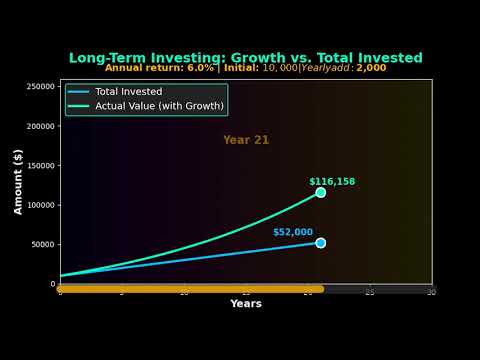 Tinkering with Animations | Post
 Data In Motion Repo
Applications
Tech Talk Intro Videos
Ive used hyperframe as a second test here
The goal?
To make a catchy short video as an intro for this big data x dht’s related tech talk
thats amazing, now with your hyperframe skills, and looking at the dht-webapp look and feel, can we make a intro-video.md with a draft of what would be a catchy video that i can upload to youtube for the team to have and see whats coming? lets say 30 seconds duration. lets also consider all the psyco stuf# git clone selfhosted-landing
cd ./y2026-tech-talks\4-iot-to-bigdata\tech-talk\sensor-to-dashboard
npx hyperframes preview # preview in browser (studio editor)
npx hyperframes render # render to MP4
cd tech-talk/sensor-to-dashboard && npx hyperframes render --quality highSee http://localhost:3003/#project/sensor-to-dashboard
You can add it to readme.md like:
[](https://www.youtube.com/watch?v=51kgUUPyIWY) Data Stories - F1, Finance…
You could go with matplotlib:
#git clone https://github.com/JAlcocerT/eda-f1
#cd eda-f1
make help
Or with remotionJS:
#https://github.com/JAlcocerT/eda-f1/tree/master/remotion-f1
git clone https://github.com/JAlcocerT/VideoEditingRemotion
cd ./VideoEditingRemotion/remotion-cc
#time npx remotion render GoldPrice gold-price.mp4 #just 20seconds
#npx remotion render GoProHudB renders/gopro-hud-GH020417.mp4 --concurrency=2                                                     #https://github.com/JAlcocerT/VideoEditingRemotion/blob/main/remotion-cc/src/F1ChampionshipComposition.tsx
make render-f1-championship
See this
Who could guess that gold is so beautiful to animate?
#make render-gold
#make render-inflation-fedrate
make render-yield-curve
Or this
yea, financial data called via API and rendered into a video:
A Proper brand
Are you selecting? or being selected?
wt* am I talking about?
Im saying if you were the one who selected your partner, your job, the place that you live in
Or if that was chosen for you.
If you have not, you need backend engine, the hard skills.
And like it or not, also the soft/frontend/marketing/attraction ones.
Remember that white labeled RE solution that went nowere due to missing basic disqualification non performed?
npx skills add heygen-com/hyperframes
#npx skills add remotion-dev/skills
Some claude, 10min and 50% tokens consumed later:
git clone
cd ./jalcocertech-services\channel-youtube\brand-template
npx hyperframes preview
#npx hyperframes render
Not sure what to pick?
| Dimension | HyperFrames | RemotionJS |
|---|---|---|
| File complexity | One HTML file | Full React project (package.json, TSX, config) |
| Learning curve | CSS + GSAP — familiar if you do web | React + TypeScript + Remotion API |
| AI generation | Very high — Claude writes HTML in one shot | Medium — needs project scaffold + component structure |
| Animation power | GSAP — industry standard, extremely capable | interpolate() + spring() — powerful but more verbose |
| Setup time | npx hyperframes init → write HTML → render | npx create-video → write TSX → wire composition → render |
| Reusability | Copy HTML scenes between files | React components are properly modular and importable |
| Data-driven content | Manual or templated strings in HTML | Clean — pass props, map arrays, compute from data |
| TTS / captions | Built-in: npx hyperframes tts | Manual integration |
| Community / docs | Small, new | Large, established — lots of examples |
| Best for | Quick branded videos, architecture diagrams, idents, one-off compositions | Long-form series, data-driven videos, reusable component libraries |
Conclusions
The reason people are “lost without enough details” is that they lack Pattern Recognition (the horizontal bar of T-shape).
Get to know the connections your team is missing:
 Consulting Services
 DIY via ebooks
HyperFrames in one sentence: it’s literally one HTML file.
You write scenes as divs, animate with GSAP in a script tag, and the CLI captures the browser to MP4.
An AI agent can write the whole thing in one pass — which is why brand-template/index.html just appeared from a brief.
RemotionJS: a proper React project with TSX components, useCurrentFrame(), a full Node build pipeline.
More setup, more structure, genuinely better for data-driven or reusable component scenarios.
The practical split: HyperFrames for anything visual/animated (idents, diagrams, title cards, stat animations), RemotionJS for the automated repo→video pipeline where you’re feeding structured data into a template.
Both tools, different jobs.
Adding to the previous some stitch and claude design.
cd ./jalcocertech-services\channel-youtube
uv run python genbi-1/transcribe.py
#genbi-1/generate_tts.py
cd genbi-1
#npx hyperframes transcribe narration.wav
npx hyperframes preview .
#npx hyperframes render- Write the script — spoken-word rules, say URLs as words, read it aloud first
- Generate audio — npx hyperframes tts or the Python script, with voice/speed guide
- Get word timestamps — uv run python transcribe.py (avoids the whisper.exe path conflict)
- Map words to triggers — the 0.2–0.4s early rule, with the genbi-1 mapping as a concrete example
- Wire the GSAP timeline — use real timestamps as position parameters, not guesses
- Preview and fine-tune — npx hyperframes preview . for scrubbing
- Render — npx hyperframes render .
The key insight documented: Whisper may mishear words (“Jira” → “Gira”) but the timestamp is still correct — the engine timestamps the sound, not the spelling.
And the note on why we didn’t use HyperFrames auto-captions here: the text IS the animation, not a subtitle overlay.
About Design Thinking
Design thinking isn’t a single step in the requirements process; it is the “discovery engine” that fuels the quality of your documentation.
While these documents are often seen as a linear progression, design thinking ensures that what you are documenting actually solves a human problem.
Here is how design thinking integrates into the lifecycle of a Business Requirements Document (BRD), Product Requirements Document (PRD), and Functional Requirements Document (FRD).
- The BRD (The “Why”)
Role of Design Thinking: Empathize & Define
The BRD focuses on high-level business goals. Design thinking plays a critical role here by ensuring the business goal aligns with a genuine user need.
- Stakeholder Empathy: Using empathy maps to understand the pain points of the business owners and the end users.
- Problem Reframing: Instead of a BRD saying “We need a loyalty app,” design thinking helps the BRD say “We need to reduce customer churn by increasing emotional engagement.”
- Outcome: A BRD grounded in a validated “Problem Statement” rather than just a list of features the board wants.
- The PRD (The “What”)
Role of Design Thinking: Ideate & Prototype
The PRD bridges the gap between business needs and the technical solution.
This is where design thinking is most visible.
- Ideation: Facilitating workshops (like “Crazy 8s”) to explore various ways to solve the problems defined in the BRD.
- User Stories & Personas: Crafting requirements based on specific user archetypes developed during the research phase.
- Low-Fidelity Prototyping: Before a single line of requirement is finalized, paper prototypes or wireframes are tested to see if the “What” actually works for the user.
- Outcome: Requirements that are prioritized based on Desirability (User), Viability (Business), and Feasibility (Tech).
- The FRD (The “How”)
Role of Design Thinking: Test & Iterate
The FRD is highly technical, detailing how the system must behave to satisfy the PRD. While it feels “colder” and more functional, design thinking acts as the guardrail.
- Usability Testing: If a functional requirement describes a complex multi-step checkout, design thinking asks: “Is this cognitively too heavy for the user?”
- Edge Case Discovery: By “Testing” the logic through the lens of a user journey, you identify functional gaps—like what happens when a user loses internet mid-transaction.
- Outcome: A technical specification that doesn’t just work perfectly under the hood, but maintains a seamless “Human-Computer Interaction” (HCI).
| Document | Primary Focus | Design Thinking Phase | Key Activity |
|---|---|---|---|
| BRD | Business Goals | Empathize | User interviews & Market research |
| PRD | Product Features | Define & Ideate | Persona building & Wireframing |
| FRD | System Behavior | Prototype & Test | Usability validation & Logic flows |
The Big Picture: Without design thinking, a BRD/PRD/FRD chain produces a product that is technically functional but useless.
Design thinking ensures that the “Golden Thread” of user value remains intact from the first business meeting to the final technical spec.
Both Lean Startup and Systems Thinking act as different “operating systems” for your documentation.
While Design Thinking focuses on human needs, Lean Startup focuses on market viability, and Systems Thinking focuses on structural logic.
Here is where they plug into the BRD, PRD, and FRD framework:
- Lean Startup (The “Build-Measure-Learn” Loop)
Lean Startup thrives in environments with high uncertainty.
It shifts the documentation from “predicting the future” to “testing a hypothesis.”
- In the BRD (Pivot or Persevere): The BRD becomes a collection of hypotheses rather than fixed requirements. Instead of “The business needs X,” it’s “We believe that by doing X, we will achieve Y (Metric), and we will know we are right when we see Z (Data).”
- In the PRD (The MVP): Lean Startup aggressively prunes the PRD. It forces the team to identify the Minimum Viable Product. Any feature that doesn’t directly test the core hypothesis is moved to a “Backlog” or discarded to save speed.
- In the FRD (Instrumentation): The FRD must include “Analytics Requirements.” You aren’t just documenting how a button works; you are documenting how that button’s usage is tracked and measured to feed the “Learn” part of the loop.
- Systems Thinking (The “Big Picture” View)
Systems thinking is used when a product is part of a massive, interconnected ecosystem (like a city’s power grid, a global supply chain, or a complex ERP).
- In the BRD (Interdependencies): Systems thinking identifies Feedback Loops. A business goal to “Increase Sales” might have a reinforcing loop that accidentally “Overwhelms Customer Support.” The BRD uses systems mapping to ensure the business goal doesn’t break another part of the company.
- In the PRD (Contextual Impact): The PRD looks beyond the user’s screen. It defines requirements for how this product interacts with third-party APIs, legacy databases, and environmental factors. It ensures the “What” doesn’t cause a “Butterfly Effect” of errors elsewhere.
- In the FRD (Structural Logic): This is where Causal Loop Diagrams or Stock and Flow Diagrams live. The FRD defines the system’s “State”—how data flows through the pipes, where it pools (stocks), and what triggers the release of information.
| Framework | Best fit in… | Key Question it answers |
|---|---|---|
| Design Thinking | PRD (mostly) | Is this the right solution for the human? |
| Lean Startup | BRD & PRD | Is there a market for this, and how can we prove it fast? |
| Systems Thinking | BRD & FRD | How does this change affect the entire ecosystem? |
How to combine them
In a modern product team, you rarely use just one.
You might use Systems Thinking to map out the complexity of a new healthcare platform (BRD), Design Thinking to figure out how a doctor will actually use the tablet (PRD), and Lean Startup to decide which single feature to build first to see if patients even want to log in (MVP).
Does your current project feel more like a “human” problem (Design), a “market” mystery (Lean), or a “complex machine” (Systems)?
FAQ
- GSAP (GreenSock Animation Platform) is a JavaScript library for animating things on a webpage — moving elements, fading them in, scaling them, rotating them — with precise control over timing.
The core idea: instead of CSS transitions (which are limited and hard to sequence), GSAP gives you a programmable timeline where you say exactly what happens and when.
Why HyperFrames uses it: when you render a video, the capture engine scrubs through time frame by frame.
GSAP’s timeline is deterministic — at t=14.1s, element X is at exactly this position, with exactly this opacity.
The capture engine reads that state and renders it to a pixel-perfect video frame.
F/OSS Animations Suites
Synfig Studio: Synfig Studio is a 2D vector-based animation software. It’s designed for creating high-quality 2D animations with a focus on flexibility and scalability. Synfig Studio supports a wide range of features, including vector tweening, bone rigging, and bitmap artwork integration.
OpenToonz: OpenToonz is a professional 2D animation software used by studios such as Studio Ghibli. It offers a comprehensive set of features for traditional frame-by-frame animation, including raster and vector drawing tools, compositing, and animation effects.
More Open Source Animation Suites 👇
Krita: While primarily known as a digital painting software, Krita also includes animation features. It supports frame-by-frame animation and offers a range of tools for creating and editing animations, including onion skinning, timeline-based editing, and brush-based animation.
Pencil2D: Pencil2D is a simple and intuitive 2D animation software suitable for beginners and hobbyists. It offers basic drawing and animation tools for creating traditional frame-by-frame animations.
TupiTube: TupiTube is a 2D animation software designed for children and beginners. It provides a simple and user-friendly interface for creating basic animations using vector-based drawing tools.
Motion Canvas
- Recently Motion Canvas was released as Open Source as well, with MIT license ❤️ - https://github.com/motion-canvas/motion-canvas
Motion Canvas is a tool that bridges the gap between code and animation, specifically targeted at creating animated videos.
- Create Animations with Code: https://github.com/motion-canvas/motion-canvas
A TS library for creating animated videos using the Canvas API.
MIT| Visualize Your Ideas With Code
More about Motion Canvas 📌
Library & Editor: Motion Canvas offers two main parts:
Library (written in TS): This library allows you to write animation code using generators, providing a structured approach for creating animations.
Web-based Editor: This editor provides a real-time preview of your animations as you write the code.
Animation with Canvas API: Motion Canvas leverages the Canvas API, a built-in functionality of web browsers that allows for dynamic manipulation of graphics.
This gives you control over various visual elements of your animation.
Benefits:
Combined Power of Code and UI: Motion Canvas offers the benefits of both writing code for precise control and a visual editor for intuitive adjustments, making it suitable for users with different comfort levels. –>
To use Motion Canvas, you’ll need a few things:
Node.js and npm: Motion Canvas relies on Node.js, a JavaScript runtime environment, and npm (Node Package Manager) for managing dependencies. You can download and install them together from the official Node.js website: https://nodejs.org/en
Code editor: You’ll need a code editor of your choice to write and edit your Motion Canvas code. Popular options include Visual Studio Code, Atom, or Sublime Text.
(Optional) ffmpeg: While not strictly necessary for basic functionality, ffmpeg is a powerful tool for video encoding and manipulation. Motion Canvas can leverage ffmpeg for exporting your animations as videos. You can find installation instructions for ffmpeg based on your operating system through a web search.
Motion Canvas is great for interactive, visually rich web animations.
Others
Remotion is best for React developers needing video automation and scaling.
Manim is the tool for deep mathematical visualization with powerful programmatic control.
| Feature/Aspect | Motion Canvas | Remotion | Manim |
|---|---|---|---|
| Programming Language | TypeScript (Web, JS) | React (JavaScript) | Python |
| Main Use Case | Vector animations & presentations | Programmatic video creation | Math & educational animations |
| Preview/Interactivity | Real-time visual preview | React-driven dynamic rendering | No live preview, manual rendering |
| Complexity & Control | Moderate, web tech based | High for UI/UX videos | High for math/algorithm detail |
| Target Users | Web developers, educators | React developers, marketers | Educators, researchers, math pros |
| Learning Curve | Moderate | Moderate | Steep (programming + math) |
| Community & Docs | Growing, good docs | Strong community & documentation | Mature community, rich resources |
https://github.com/HandBrake/HandBrake - an OSS UI for Video compression (which does not use FFMPEG)