[Energy Solutions] Insulation Intelligence in the AI era
Tl;DR
The kind of simulation that people dont ask before commiting 300k+
Intro
How confy is going to be a flat that just exists over a conceptual drawing?
Coming from this post with a solar experiment
git clone https://github.com/JAlcocerT/RPiYou got it here: picow-dht-webapp-vpd-poc-webapp
- https://github.com/JAlcocerT/RPi/tree/main/Z_MicroControllers/ESP32/esp32-c/mqtt-dht11-dashboard
- https://github.com/JAlcocerT/RPi/blob/main/Z_MicroControllers/ESP32/esp32-c/esp32-dht11-mqtt-emqx.cpp
- https://github.com/JAlcocerT/RPi/tree/main/Z_MicroControllers/dht-webapp
- https://github.com/JAlcocerT/RPi/tree/main/Z_MicroControllers/RPiPicoW/picow-dht-webapp-vpd-poc
- https://github.com/JAlcocerT/RPi/tree/main/Z_MicroControllers/RPiPicoW/picow-dht-webapp
The Sun is interesting
With all that push of energy to us via radiation
What about blender?
I made some simulations recently on how sun rays are hitting our buildings:
sudo snap install blender --classic --channel=5.1/stable
#cd ./poc/building-to-blender
#make help
Then, this happened.
IoT, Walls, Sun and Heat Transfer
Previoulsy I thought that Linux was tricky compared to W11 to push code towards microcontrollers.
I was wrong
It seems that we dont even need arduino GUI
A proper data cable + arduino CLI does the job:
cd ./poc/iot-rpi-dht
arduino-cli board list #make serial-list- Fix serial access for this session:
sudo setfacl -m u:$USER:rw /dev/ttyACM0- Edit WiFi in:
iot-rpi-dht/scripts-microcontrollers/firmware-esp32/esp32-dht11-mqtt-emqx-deepsleep.cpp
const char* WIFI_SSID     = "your-wifi";
const char* WIFI_PASSWORD = "your-password";
const char* MQTT_BROKER = "192.168.1.14";- Upload:
cd /home/jalcocert/Desktop/poc/iot-rpi-dht/scripts-arduino-setup
./upload-deepsleep.sh /dev/ttyACM0
EMQX is already running on this laptop at
192.168.1.14:1883.
So you just need the storage layer:
#make sqlite-count
# cd ./poc/iot-rpi-dht/scripts-microcontrollers/backend-node-sqlite
sqlite3 data/readings.sqlite "select * from readings order by received_ms desc limit 10;"
#2|esp32/humidity/dht11|humidity|45.0|2026-06-04T14:42:47.351Z|1780584167351
#1|esp32/temperature/dht11|temperature|25.3|2026-06-04T14:42:47.251Z|1780584167251
I made it better: because hardcoding wifi/pwd is not nice
#make serial-sketch
make serial-fix PORT=/dev/ttyACM0
make flash
See that the ESP32 is having proper logs while still connected and that emqx is getting the messages:
make serial-log PORT=/dev/ttyACM0 #see whats flowing
#http://192.168.1.2:18083/#/
make emqx-remote #admin/public.18083 #this one can work not only with the local emqx as the previous ones
make mqtt-listen MQTT_HOST=192.168.1.2 MQTT_TOPIC='esp32/#
Thensimilarly for the picow DHT22:
make serial-fix PORT=/dev/ttyACM0
make flash-picow

make mqtt-listen MQTT_HOST=192.168.1.2 MQTT_TOPIC='pico/#'
So with both pushing data: started here with thermodynamics and ~ aerotermia+dht22
#git clone /poc
cd ./poc/iot-rpi-dht/
We can have this view:
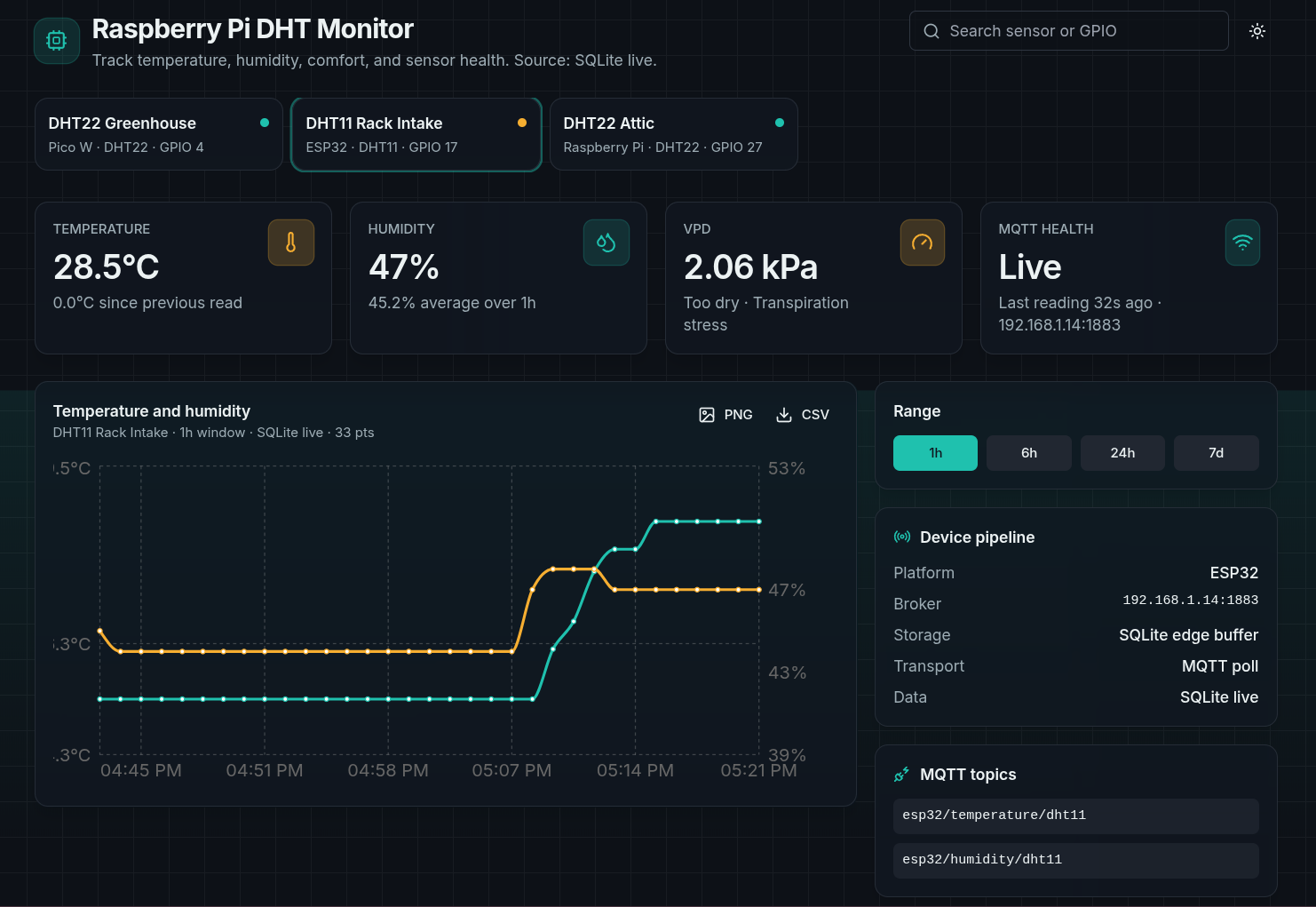
And improve it with these MQTT flows:
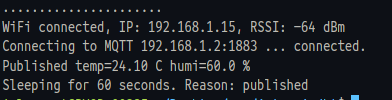
make mqtt-listen MQTT_HOST=192.168.1.2 MQTT_TOPIC='pico/#'
#  make arduino-compile
# make serial-fix PORT=/dev/ttyACM0
# make flash # make flash PORT=/dev/ttyACM0
make mqtt-listen MQTT_HOST=192.168.1.2 MQTT_TOPIC='esp32/#'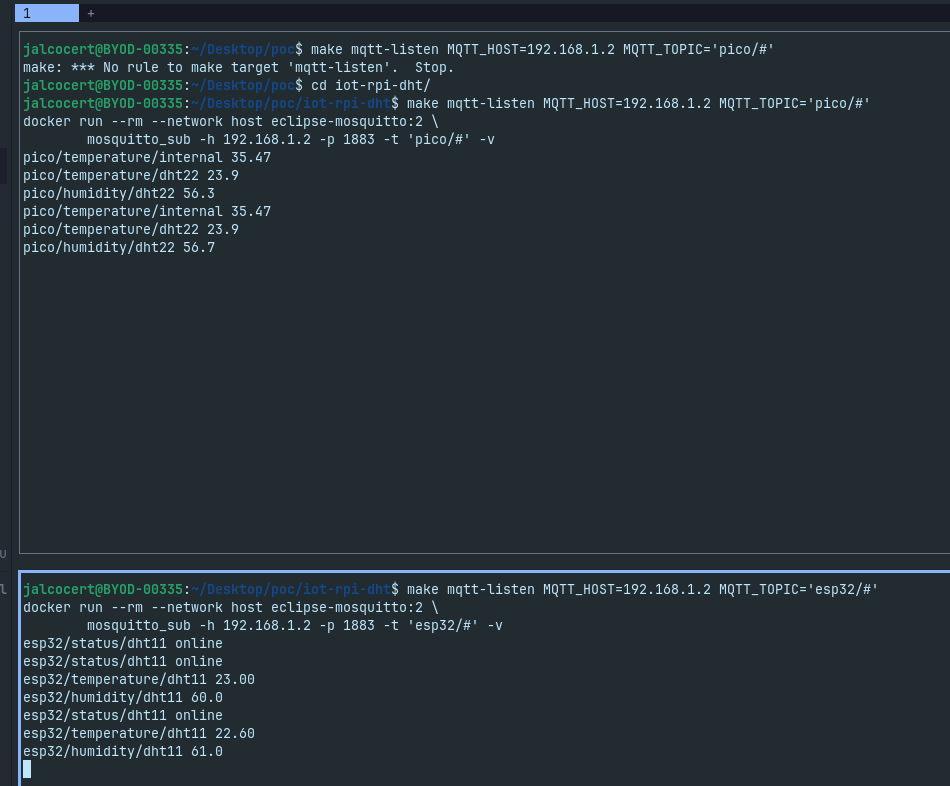
Running this at the homelab for a few days: yea, there is a cool UI
cd ./poc/iot-rpi-dht-insulation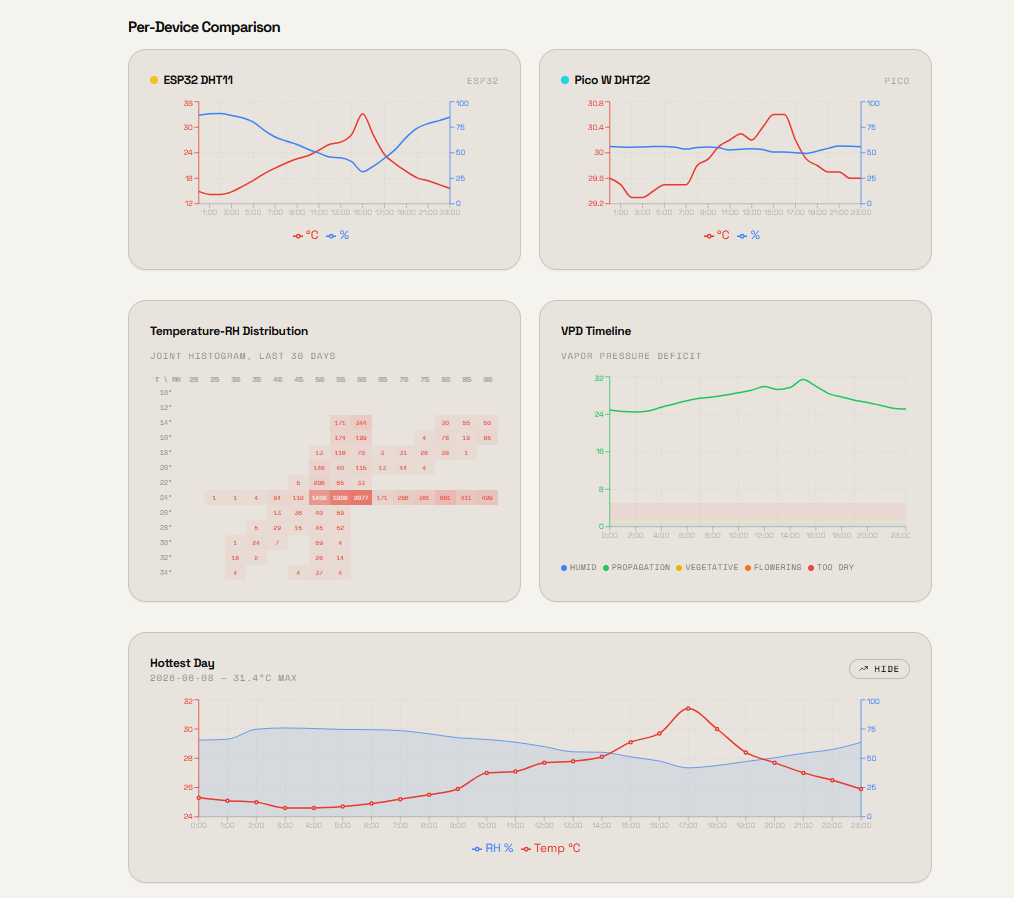
We need the MLX
The DHT’s are great, but they only measure ambient temperature.
We need a MLX90614 to measure the surface temperature of the wall, because that is what will determine the heat transfer from the wall to the inside.
Of course there is a lot of work on this topic, as you may guess:
cd ./poc/iot-rpi-mlx/Im levereging the public scripts for this sensor here
And the final dashboard
The one that combines all the goodies of previous steps, with the UI/X ive polished:
cd ./poc/iot-rpi-dht-insulation
#docker compose up -d --build dashboard
MQTT_HOST=192.168.1.2 docker compose up -d --build dashboard #so that emqx at homelab is reachable to sqlite and webapp
Run this any time to check:
sqlite3 ingester/data/readings.sqlite \
  "SELECT device, metric, COUNT(*), ROUND(AVG(value),1) FROM readings GROUP BY device, metric;"

#Or see the latest readings:
sqlite3 ingester/data/readings.sqlite \
  "SELECT device, metric, value, received_at FROM readings ORDER BY received_ms DESC LIMIT 10;"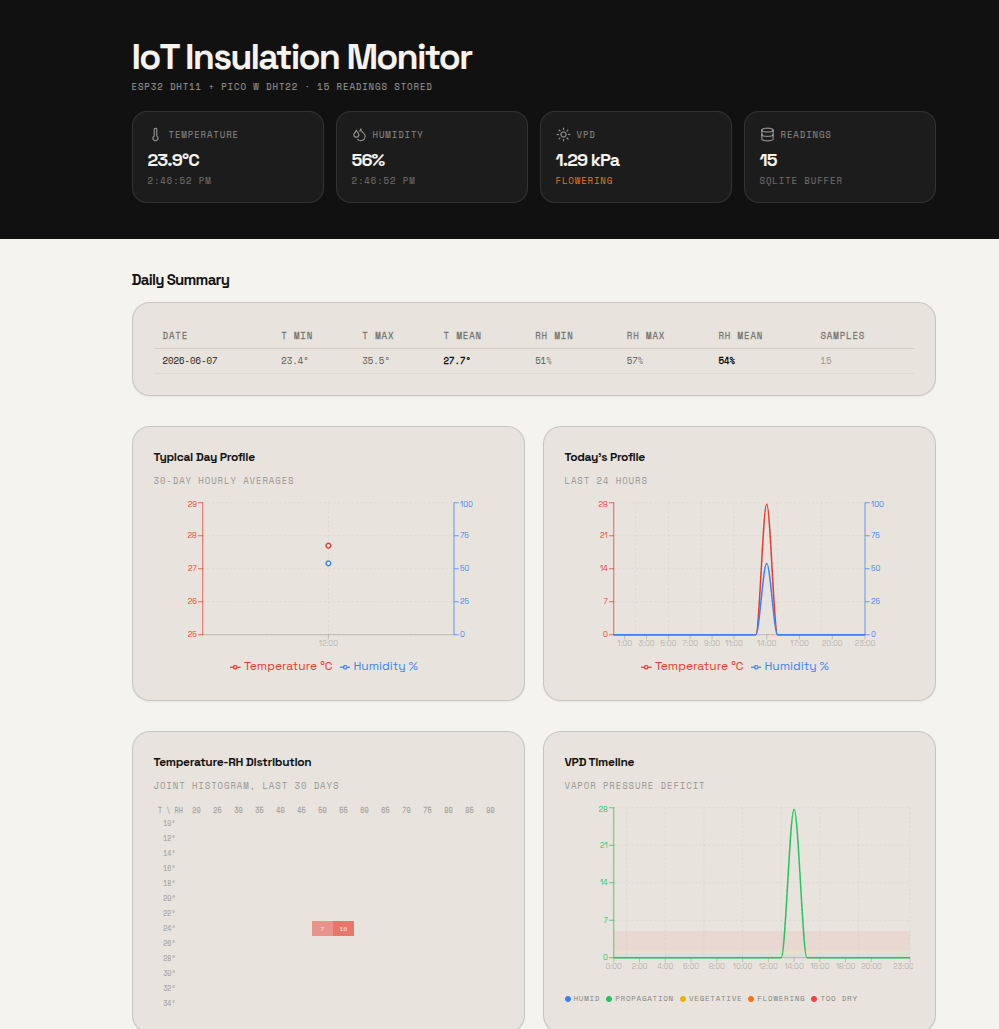
I also tried it from the homelab: MQTT_HOST=192.168.1.2 docker compose up -d --build
Conclusions
Keep thermodynamics fresh
And just…
Measure, dont model:


FAQ
Solar vs Wind
The cost of a small wind turbine for a home ranges from 3k$ to 8k$ per kilowatt installed.
In contrast, an equivalent 1 kW solar panel system would cost about $2,770 on average in the U.S. (SRT 00:07:46 - 00:08:04).
- Source: https://www.youtube.com/watch?v=nPvTH7Siclg
- Channel: Undecided with Matt Ferrell
Wind turbines look really cool anyways :)
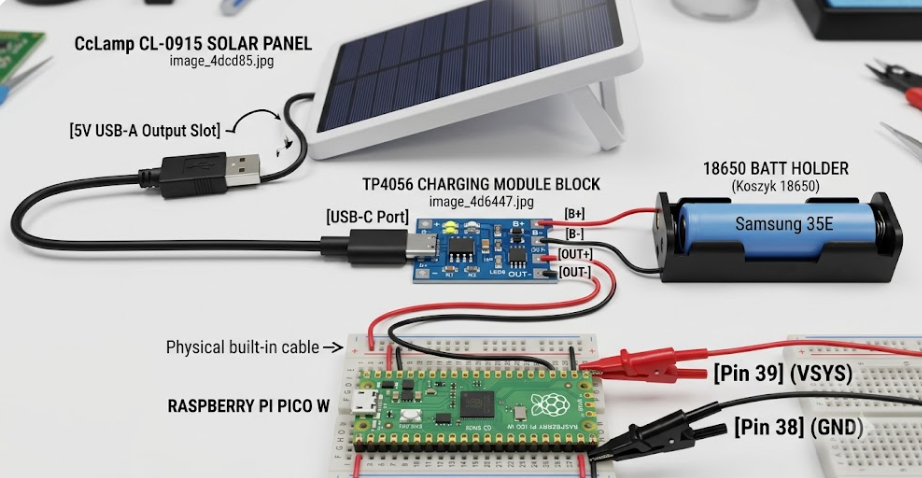
Home Solar Test x TP4056
Together with a 3$ rechargable battery: Samsung INR18650-35E
Same that work for the radiomaster pocket!
The TP4056 USB-C solar charging module is designed to charge batteries at a standard rate of 1 Amp (1000mA).
The Samsung 35E datasheet states its ideal standard charge rate is 1.7 Amps, meaning your TP4056 board will charge this battery completely safely and well within its comfort zone without overheating the battery cell.
The Pi Pico W draws roughly 0.1 Amps maximum when its Wi-Fi radio is blasting a data packet.
Since your cell can safely output up to 8 Amps, the Pico W won’t even wake the battery up.
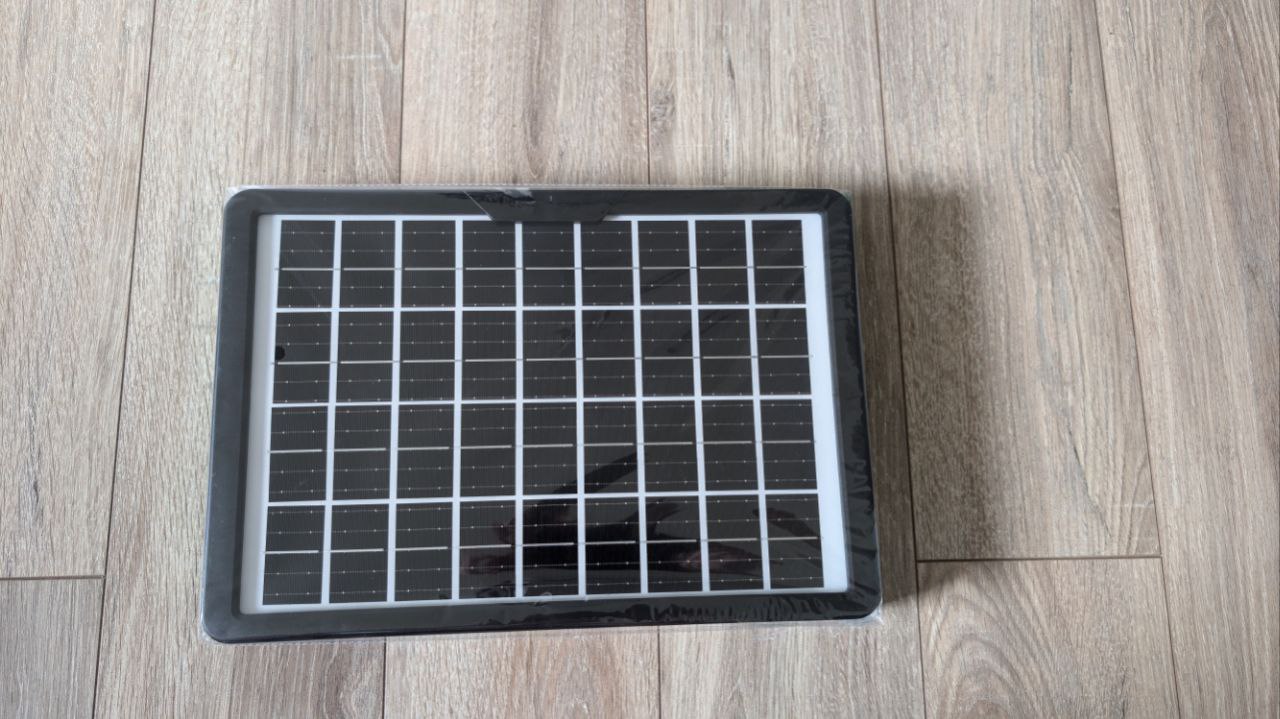
Mine is a simple 5V panel, in theory up to 15W:
And who knows, I might be making some IoT x DSc project with tech talk around it.
Which AC is enough for my house?
There is a rule of thumb that experts in the field mentioned: