Ryze Robotics Dron and Python SDK
Tl;DR
More tinkering in the real world.
Intro
As software is cheap, if plants are not for you
Maybe… drones/electronic/robotics are?
I got a dji tello some time back, and wanted to tinker back with the agents and the python logic that controls it
Took the python CLI and made a PySide6 desktop out of it:
cd ./dron/desktop-version #gitlab one :)
uv sync
uv run main.py
Claude x Python
This is all it takes recently:
#claude
sometime ago i was using python to control my dji tello dron, do you understand the logic i built? create a wiki.md with ur understandingI also extracted the documentation for claude:
uv init
uv add kreuzberg
You can skip Kreuzberg container, just:
for f in Chapter*.pdf; do
  uvx kreuzberg extract "$f" > "${f%.pdf}.txt"
done
Once the context is ready, its about creating a FRD.md and let CC split the work in few phases:
uv run main.pyThis is all based on OSS libraries, so you wont need ever again the official app which is no longer in the google play store.
Computer Vision
After a quick test, I thought about adding face detection capabilities:
uv run face_detection_poc.pySame thing we learnt with the pi, using the CV2 library (executed at your laptop, not the dron)
Its just the same ppl take this to the next level
see this video ‘pre-ai’
About PySymverse
From the same channel, i got to know about: https://pypi.org/project/pysimverse/
From scripts to the Sky (if you have an account)
Conclusions
I got this main.py to control the DJI Tello via python CLI while seeing the camera feed.
Wouldnt it be nice to do a come back to electrical engineering?
The level of abstraction that there is in such a drone so that by pressing one key, that goes to one command and goes to…somewhere
and that somewhere makes the motors do something in particular to rotate, acelerate…
Not gonna lie to you
i have a dji tello dron and succesfully got a python script that uses its SDK to control it. Here is the python code and the documentation I used to do so. The android official apps is no longer valid, so i want to use flutter to build a crossplatform one that does precisely what my python script does. Can we do a flutter-version.md with all the features and clarifications?# 1. Verify you're on Tello's Wi-Fi
iwconfig # or check Network settings
# 2. Ping the drone
ping 192.168.10.1
# Test with netcat (simple UDP)
echo -n "command" | nc -u -w1 192.168.10.1 8889This is happening already…
sudo snap install flutter --clasic
#git init && git add . && git commit -m "Initial commit: Starting flutter dji tello dron" && gh repo create dron-tello-flutter --private --source=. --remote=origin --push

#uv init
#uv add -r requirements.txt
#uv sync
#cd sample-pyscipe
uv run main.py

#make run #requires .env.local
#git remote set-url origin git@gitlab.com:fossengineer1/dron.git
#git push
What I learnt
Flutter development is not straightforward: https://github.com/JAlcocerT/dron-tello-flutter
Want this DFY?
f* off
flowchart LR
    %% --- Styles ---
    classDef free fill:#E8F5E9,stroke:#2E7D32,stroke-width:2px,color:#1B5E20;
    classDef low fill:#FFF9C4,stroke:#FBC02D,stroke-width:2px,color:#F57F17;
    classDef mid fill:#FFE0B2,stroke:#F57C00,stroke-width:2px,color:#E65100;
    classDef high fill:#FFCDD2,stroke:#C62828,stroke-width:2px,color:#B71C1C;

    %% --- Nodes ---
    L1("Free Content
(Blog/YT $0)"):::free
    L2("DIY
(Templates / Platform) $"):::low
    L3("Done With You
(Consulting) $$"):::mid
    L4("Done For You
(Services) $$$"):::high

    %% --- Connections ---
    L1 --> L2
    L2 --> L3
    L3 --> L4
I mean, here you go:
FAQ
Tello x Flutter
I got some problems with the connection to the tello for the flutter desktop app code
CC went to the route of we’re using dart:io's built-in RawDatagramSocket, but some how was not getting there.
So went out and look for existing projects:
Cool!
But…
it has 6yo and depends on https://pub.dev/packages/tello/versions which is Dart3 incompatible.
Next -
- https://pub.dev/packages/udp/versions that does not shows incompatibilities
#ping 192.168.10.1
flutter run -d linux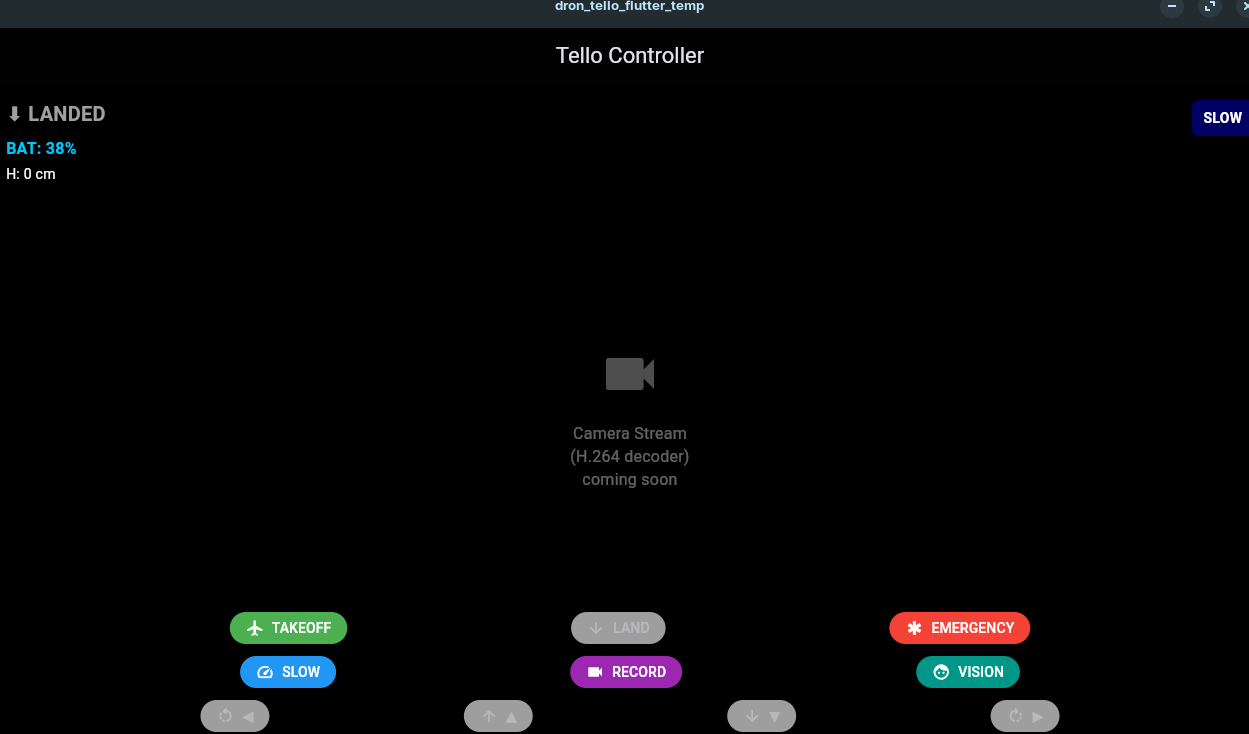
This is the flutter desktop app i managed to put together, with battery indication but no cam support yet :)
- https://pub.dev/packages/ryze_tello with 5yo and also in theory, no incompatibilities
Whats ArduPilot?
ArduPilot is an open-source autopilot system for vehicles like:
- drones
- planes
- helicopters
- rovers
- boats
- submarines
It is both:
- software: the flight/control stack that runs on the vehicle
- ecosystem: firmware, ground control tools, hardware support, simulation, and documentation
What it does:
- stabilizes and flies the vehicle
- handles GPS navigation and waypoint missions
- supports telemetry, failsafes, return-to-home, geofencing
- integrates sensors like GPS, IMU, compass, barometer, lidar, cameras, etc.
Typical setup:
- flight controller hardware running ArduPilot firmware
- a ground station such as Mission Planner or QGroundControl
- optional radio/telemetry link, RC transmitter, GPS, companion computer
In practice, people use it for:
- hobby drones
- research robots
- industrial UAVs
- autonomous boats and ground vehicles
Software for Drones
Drone Log analyzer: A high-performance universal dashboard application for organizing and analyzing DJI/Litchi flight logs privately in one place.
Built with Tauri v2, DuckDB, and React.
About computer vision
If OpenCV is the heavy-duty engine, CVZone is the ergonomic dashboard and steering wheel that makes it much easier to drive.
- What is CVZone?
CVZone is a high-level Python package designed to make computer vision tasks—like hand tracking, face detection, and object tracking—accessible with just a few lines of code.
It was created largely by Murtaza Hassan (Computer Vision Zone) to simplify the often complex boilerplate code required by standard libraries.
- Core Logic: It is built on top of OpenCV (for image processing) and Mediapipe (for high-performance AI tracking).
- Key Features: It includes “ready-to-use” modules for:
- Hand Tracking: Finding 21 landmarks on a hand and detecting gestures.
- Face Detection & Mesh: Real-time facial landmark mapping.
- Pose Estimation: Tracking body joints for fitness or motion apps.
- Utilities: Easy functions for drawing styled rectangles, putting text on screen, or stacking multiple images together.
- Does it relate with
cv2(OpenCV)?
Yes, they are best friends. CVZone does not replace cv2; it complements it. In a typical script, you will import both. CVZone takes the “raw” outputs from OpenCV or Mediapipe and handles the math and drawing for you.
- Example Comparison: * To draw a “fancy” cornered rectangle in standard
cv2, you might need 10+ lines ofcv2.line()calls.- In
cvzone, you simply callcvzone.cornerRect(img, bbox).
- In
The Flow: You use
cv2to capture your webcam feed and display the window, but you usecvzoneto process the AI logic and draw the overlays.
- Open-Source Models (The “Heavy Hitters” of 2026)
If you want to move beyond the basic tracking in CVZone, here are the top open-source models currently dominating the field:
| Model Category | Top Open-Source Recommendation | Best For… |
|---|---|---|
| Object Detection | YOLOv11 (Ultralytics) | Lightning-fast detection of 80+ types of objects. |
| Segmentation | SAM 2 (Segment Anything) | “Click-to-cutout” any object in a video or image. |
| Face Recognition | DeepFace / InsightFace | Identifying specific individuals, not just finding “a face.” |
| Multimodal | Qwen2.5-VL | Models that can “see” and then “talk” about what they see in detail. |
| Hand/Face/Body | Mediapipe (The engine of CVZone) | Low-latency tracking that runs perfectly on CPUs/Mobile. |
Which should you choose?
- For Beginners: Stick with CVZone. It abstracts the scary math and lets you build projects like “Virtual Paint” or “Gesture Volume Control” in an afternoon.
- For Professional Apps: Use YOLOv11 or SAM 2 directly. They offer more precision and are the industry standards for tasks like self-driving car logic or medical imaging.