Optimum Path x HUD - Desktop
TL;DR
I was not expecting to do cool desktop apps.
Nor using Go Lang.
Intro
You forgot about LRV and THM already.
The juice is at those MP4 from the gopros.
The last time I tinkered with this here
But I wanted to package this into some desktop app, not to think anymore about dependencies.
Basically to close the features, just bring me those GPH9 or GPH13 videos and lets enjoy the result.
#git clone https://github.com/JAlcocerT/optimum-path
#cd optimum-path/overlay
uv run gopro_h9_h13_hud_fastlap.py
#mpv "flying_lap_79.50s.mp4"

git init && git add . && git commit -m "Initial commit: simple go desktop app for karting videos" && gh repo create go-karting --private --source=. --remote=origin --push

git clone https://github.com/JAlcocerT/go-karting
claude --remote-control "Go Karting"
#/mobile
I made this one alive with claude code.
But I guess you could have with Kilo Code, Zed, Antigravity, Void…
#curl -f https://zed.dev/install.sh | sh
#wget https://github.com/voideditor/binaries/releases/download/v1.0.2/Void-x86_64.AppImage ~./Applications
Why not Python desktop?
I tried it here with tkinter, but was not convinced about the concept.
The feature of the optimum path given the telemetry and the Gradient descent would be a nice thing to have also in GO, isnt it?
(snap info go 2>/dev/null | grep "latest/stable" || echo "snap not available or no go snap" apt-cache show golang-go 2>/dev/null | grep Version | head -3)
sudo snap install go --classic
echo 'export PATH=/snap/bin:$HOME/go/bin:$PATH' >> ~/.bashrc
source ~/.bashrc
go version
sudo apt install -y libgtk-3-dev libwebkit2gtk-4.1-dev build-essential
go install github.com/wailsapp/wails/v3/cmd/wails3@latest

echo 'export PATH=$PATH:$HOME/go/bin' >> ~/.bashrc
source ~/.bashrc- github.com/u2takey/ffmpeg-go
- https://wails.io/docs/introduction
cd ./go-karting/glasshud
make dev #this spins the Go Desktop App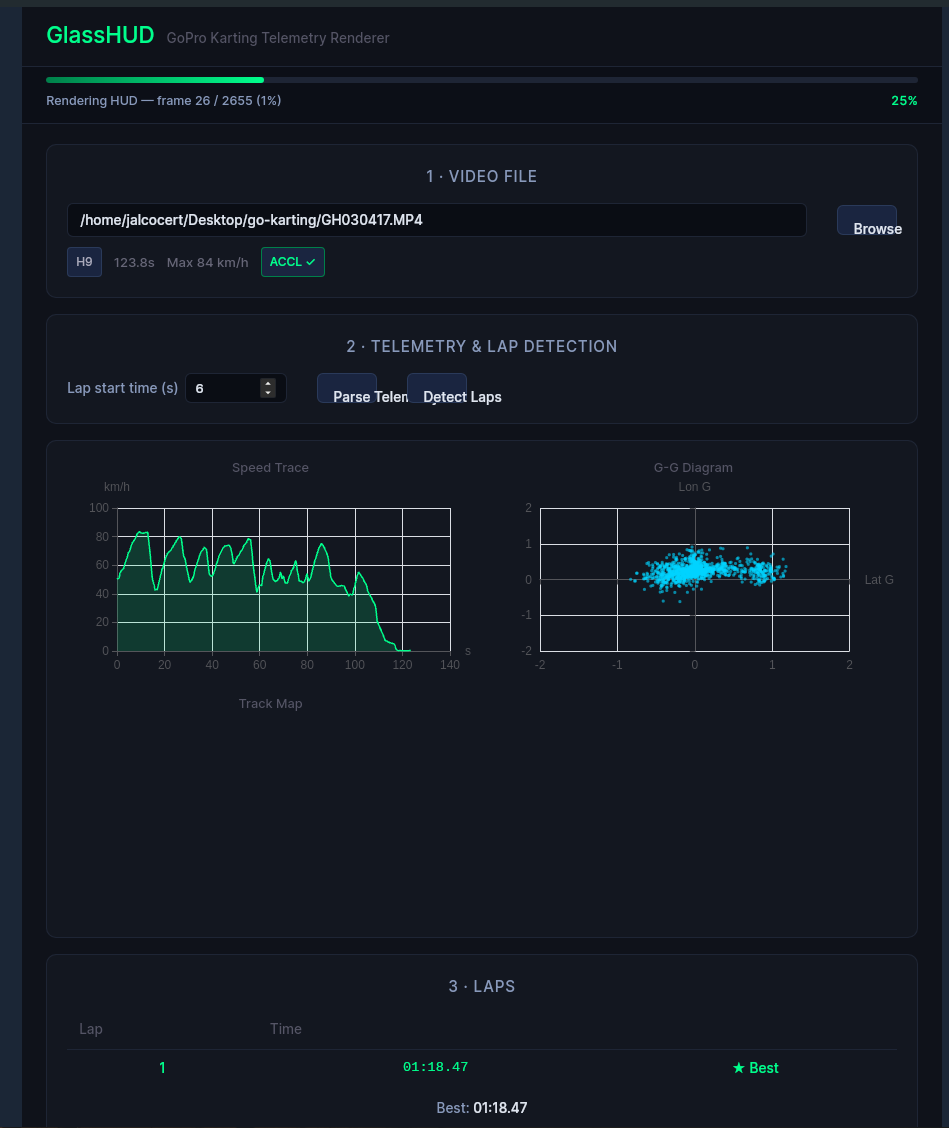
After a while….
You can just join them: this was ~x3 slower than real time for my x13
ffmpeg -i output/flying_lap_78.47s.mp4 \
       -i output/hud_flying_lap.mp4 \
       -filter_complex "[1:v]scale=3840:2160,format=rgba,colorkey=0x000000:0.1:0.1[ck];[0:v][ck]overlay=0:0" \
       -codec:a copy -preset superfast \
       output/flying_lap_with_hud_go_desktop.mp4


mpv "flying_lap_with_hud_go_desktop.mp4"
Why Go and Wails
In 2026, Go (Golang) occupies a very specific niche in the desktop world.
While it isn’t the first choice for high-end creative suites (like Photoshop) or flashy consumer apps (like Airbnb), it is the unrivaled king of “Developer Tools” and Infrastructure Apps.
If you are building something that “does work” in the background—like a local server, a file-syncing tool, or a cloud management dashboard—Go is your best friend.
Go’s “Superpowers” for Desktop
1. The “Invisible” App
Go is at its best when the app doesn’t need to be a giant window on your screen.
- Best Use Case: System tray icons, background services, and local proxies.
- Why: Go’s runtime is very efficient at idling. It won’t eat your RAM while it sits in the background waiting for a task.
2. The Single-Binary Advantage
Unlike Python (which needs a folder of files) or C (which needs DLLs), Go compiles into one single file.
- The Benefit: You can send a friend a single
.exefile via Discord or Slack, and it just runs. No “installing Python,” no “missing .NET framework,” no installer needed.
3. Concurrency (The “Goroutine”)
Go was built by Google to handle thousands of things at once.
- Best Use Case: An app that needs to download 50 files at once, or a local log-parser that scans 1,000 files in seconds.
- Why: While Rust is also fast, Go’s “Goroutines” are much easier to write and manage for 90% of developers.
Yes, Go can absolutely use VueJS, and in 2026, this is one of the most popular ways to build desktop apps with the language.
The “magic” that makes this possible is a framework called Wails.
How Go + VueJS Works (The Wails Approach)
Wails acts as a bridge. It allows you to write your “Frontend” (everything the user sees) in VueJS and your “Backend” (file system access, database logic, heavy processing) in Go.
- Communication: Wails automatically generates TypeScript/JavaScript “bindings.” This means you can call a Go function directly from your Vue component as if it were just another JavaScript function.
- Performance: Because Go handles the heavy lifting and the UI is rendered by the system’s native web engine (WebView2 on Windows, WebKit on Mac), the app stays very fast and lightweight (~15MB starting size).
Yes, the Vue part is exactly where you would handle the “cool graphs.”
In a Go + Vue (Wails) or Rust + Vue (Tauri) setup, you have access to the entire world of modern web data visualization. Since these apps run in a browser engine (WebView), any high-end charting library that works on a website will work in your desktop app.
Here is how you would use Vue to create those visuals in 2026:
- The Best Libraries for Vue Graphs Depending on what kind of “cool” you’re looking for, you have three main paths:
- ApexCharts (The “Easy & Modern” Choice): Best for clean, interactive dashboards. It has beautiful animations out of the box and a very simple Vue wrapper (
vue3-apexcharts). - Apache ECharts (The “Powerful” Choice): If you need to show thousands of data points or complex 3D globes and heatmaps without the app lagging, this is the industry standard.
- Chart.js (The “Lightweight” Choice): Perfect for simple, elegant line or bar charts that just need to look professional and load instantly.
How the “Go + Vue” Workflow Works In a desktop app, the data usually lives in Go (your backend), but the “drawing” happens in Vue (your frontend).
Go fetches the data (e.g., from a local SQLite database or a system sensor).
Go “pushes” that data to the frontend, or Vue “asks” Go for the latest numbers.
Vue receives the data as a simple JSON object and passes it into your chart component.
Example Logic:
“Hey Go, give me the CPU usage for the last 60 seconds.”
Go sends back a list of numbers. > Vue instantly updates a smooth, flowing line graph.
- Why Vue is better than “Native” for Graphs
If you were using Pure C or Pure Go (without Vue), making a graph look “cool” is incredibly difficult.
You would have to manually calculate where every line and pixel goes.
With Vue, you get:
- Interactivity: Users can hover over bars to see tooltips, zoom into timeframes, or click legends to hide data.
- Theming: You can easily match your graphs to the “Dark Mode” of the user’s operating system using CSS.
- Responsiveness: If the user resizes the desktop window, the graphs will automatically scale to fit the new size.
Summary Table: Which Charting Library?
| Library | Best For | “Cool” Factor | Performance |
|---|---|---|---|
| ApexCharts | Dashboards & SaaS tools | ⭐⭐⭐⭐⭐ | 🚀 Good |
| ECharts | Big Data / Scientific / 3D | ⭐⭐⭐⭐ | ⚡ Elite |
| Chart.js | Simple, clean reports | ⭐⭐⭐ | 🚀 Good |
| D3.js | Custom-built art/visuals | ⭐⭐⭐⭐⭐+ | 🐢 Hard to learn |
Why use Vue with Go?
- Professional UI: You can use any Vue library (like Tailwind CSS, Vuetify, or PrimeVue) to make an app that looks like a modern SaaS product rather than a clunky 90s utility.
- Type Safety: Wails v3 (the current standard in 2026) creates TypeScript models for your Go structs. If you change a data field in Go, your Vue code will immediately show an error if it doesn’t match.
- Live Development: You get the “Web Dev” experience. When you change a Vue file, the desktop app updates instantly (Hot Reload) without you having to restart the Go backend.
Comparison: Vue + Go vs. Vue + Rust (Tauri)
Since both use web technologies for the UI, the choice usually comes down to the backend language:
- Wails (Go + Vue): Use this if you want maximum development speed. Go is much easier to write than Rust, and the “glue” between the UI and the backend is more automated in Wails.
- Tauri (Rust + Vue): Use this if you need maximum security and performance. Rust offers finer control over memory and slightly smaller binaries, but it will take you longer to write the code.
Summary
If you already know a bit of Vue.js frontend, Wails is likely your best path.
It turns Go into a “super-powered” backend for your web skills, allowing you to ship a single, professional .exe or .app file that feels native to the user.
How to build for Desktop with Go in 2026
You generally have two paths, and they couldn’t be more different:
Path A: Wails (The “Modern/Beautiful” Way)
Wails is effectively “Go’s version of Tauri.”
- How it works: Your backend logic is in Go, but you write the UI in whatever web framework you like (React, Vue, Svelte).
- Why use it: This is the best way to make a Go app look like a modern 2026 app. It’s lightweight because it uses the system’s built-in web browser (WebView2/Safari).
Path B: Fyne (The “Pure Go” Way)
Fyne is a toolkit where everything—even the buttons—is written in Go.
- How it works: It uses the computer’s graphics card (OpenGL) to draw its own UI.
- Why use it: It is incredibly fast to develop. You can go from “zero” to a working window with buttons in 10 lines of code. It looks the same on every OS, though it has a distinct “utilitarian” look.
Comparison: When to pick Go over Rust?
| Situation | Pick Go | Pick Rust |
|---|---|---|
| Learning Curve | You can learn the basics in a weekend. | It might take months to master. |
| Development Speed | Very fast; “get it done” attitude. | Slower; “get it perfect” attitude. |
| Safety | Very safe (it has a Garbage Collector). | Perfectly safe (no Garbage Collector). |
| Best For… | CLIs, Internal tools, Network tools. | High-perf engines, Security software. |
Summary: Go is best at “The Functional Tool”
If you want to build a local database manager, a custom file backup utility, or a VPN client, Go is arguably better than Rust because you will finish the project 3x faster with 95% of the same performance.
Conclusions
Packing Go
make help
make deb
#make appimage (will require the deps installed)   build/linux/appimage/build/glasshud-x86_64.AppImage
cp bin/glasshud-x86_64.AppImage ~/Applications/ #this is picked up by appimagelauncher
The size difference is the key trade-off in practice: the AppImage bundles GTK + shared libraries (118 MB), while the .deb is tiny (4.4 MB) because it relies on the system having those libraries already.
For your friend:
- Send glasshud-x86_64.AppImage → they run chmod +x glasshud-x86_64.AppImage && ./glasshud-x86_64.AppImage, then install ffmpeg + exiftool if missing
- Send glasshud.deb → they run sudo apt install ./glasshud.deb and apt handles everything including ffmpeg and exiftool automatically
time make exebin/glasshud.exe — 11 MB, built from Linux with no Docker needed.
make exe is ready. What your Windows friend needs to do:
Install ffmpeg and exiftool (one-time) winget install Gyan.FFmpeg
winget install OliverBetz.ExifToolDouble-click glasshud.exe — WebView2 (Edge) is already built into Windows 10/11 so the UI works out of the box.
FAQ
Yes, absolutely. In 2026, all four languages—Rust, Python, Go, and C—can be shipped cross-platform (Windows, macOS, and Linux) from a single codebase.
However, “how” they achieve this varies significantly.
Some feel like a natural part of the OS, while others feel like a “web page in a box.”
Cross-Platform Comparison (2026)
| Language | Primary Frameworks | Distribution Difficulty | Resulting Experience |
|---|---|---|---|
| Rust | Tauri, Iced, Slint | 🟢 Easy (Single binary) | Professional, tiny, and very fast. |
| Python | PySide6 (Qt), Kivy | 🔴 Hard (Packaging is messy) | High-quality but “heavy” apps. |
| Go | Fyne, Wails | 🟢 Easy (Single binary) | Functional, but often looks “non-native.” |
| C | Qt, GTK | 🟡 Medium (Compiling is a chore) | The gold standard for “Native” look. |
- Rust: The Modern Champion
Rust is currently the favorite for cross-platform desktop apps because of Tauri.
- How it works: It uses the “Webview” already installed on your computer (Edge on Windows, Safari on Mac). This means you don’t have to ship a whole browser with your app.
- Shipping: You get a single
.exeor.appfile that is often under 10MB.
- Python: Great UI, Deployment Headaches
Python uses Qt (via PySide or PyQt), which is the most powerful UI toolkit in the world.
- The Problem: Python code isn’t “compiled.” To ship it, you have to use tools like
PyInstallerto bundle the Python interpreter, all your libraries, and the UI toolkit into one giant folder. - The Result: Even a “Hello World” app can be 100MB+. It works on all platforms, but it feels clunky to distribute.
- Go: The Practical Choice
Go is great if you want to build a tool quickly and don’t care about “fancy” animations.
- Fyne: Uses its own rendering engine (like a game). It looks the same on every OS, which is good for consistency but means it doesn’t look like a “real” Windows or Mac app.
- Wails: The Go version of Tauri. It’s excellent for web-based UIs with a Go backend.
- C/C++: The Industrial Standard
Most “big” apps (Adobe Photoshop, Microsoft Office) are written in C++.
- Qt Framework: This is the most mature cross-platform tool. It has been around for 30 years.
- The Catch: You have to set up a “build pipeline” for every OS. Compiling a C app for Mac while you are on Windows is notoriously difficult.
Which should you choose?
- Choose Rust (Tauri) if you want the best “modern” experience: small files, high security, and easy to design with web tools.
- Choose Python (PySide) if you are building an internal tool for work where file size doesn’t matter and you need a massive library of ready-made widgets.
- Choose Go (Wails) if you already know Go and want to throw a UI onto a cloud or networking tool.
About PM
In project management, what you are describing is known as the Iron Triangle (or the Triple Constraint). While they aren’t “blockers” in the sense of a technical bug, they are the four fundamental constraints that constantly push against each other.
If you change one, at least one other must be adjusted to keep the project from collapsing.
1. Scope (The “What”)
This is the list of deliverables and features.
- The Conflict: When scope increases (“Scope Creep”) without adding more time or money, quality usually drops because the team is stretched too thin.
- PM Reality: You have to protect the boundaries. If a stakeholder wants more features, they must accept a later date or a higher bill.
2. Speed / Time (The “When”)
This is your schedule and deadline.
- The Conflict: Crashing a schedule (trying to do it faster) almost always increases Price (hiring more people, paying overtime) or risks Quality (cutting corners on testing).
- PM Reality: Time is often the most “fixed” constraint. If the deadline is a hard wall, you must be aggressive about cutting Scope.
3. Quality (The “How Well”)
This is the standard the work must meet.
- The Conflict: Quality is often the “silent victim.” When a project is over-budget and behind schedule, teams feel pressured to skip reviews or documentation to catch up.
- PM Reality: Lowering quality creates “technical debt,” which blocks you later in the form of bugs and rework.
4. Price / Cost (The “How Much”)
This is the budget, including salaries, tools, and resources.
- The Conflict: A tight budget limits your Speed (you can’t hire more help) and your Scope (you can’t afford the materials/hours for extra features).
- PM Reality: Money can sometimes buy speed, but only to a point (as the saying goes: “Nine women can’t make a baby in one month”).
The “Pick Two” Rule
There is a famous PM adage that summarizes these trade-offs perfectly:
“Fast, Cheap, or Good: Pick two.”
- Fast + Cheap = Low Quality (it’ll be messy).
- Fast + Good = Expensive (you need top-tier talent and overtime).
- Good + Cheap = Slow (it will take a long time to get there with limited resources).
Other “Real-World” Blockers
While the Iron Triangle defines the constraints, actual blockers that stop work entirely often include:
- Dependencies: Waiting on another team to finish their part.
- Stakeholder Indecision: “Decision paralysis” where a lack of approval halts progress.
- Resource Availability: A key developer gets sick or a specialized tool breaks.